
The short answer: the best AI for small business marketing isn't one app. It's a general AI assistant (ChatGPT, Claude or Gemini) for writing and thinking, plus automation that connects it to the tools you already use, plus honest measurement so you can see what's working. What we've learned running AI across our own businesses is that AI earns its keep on analysis, follow-up and fixing things, not on pumping out more content. Our clearest win came from turning an AI auto-blog off, and our most expensive lesson came from AI follow-up that worked perfectly on the wrong leads.
This guide covers what we actually run, what worked, what didn't and how to pick tools for your business without paying for ten subscriptions you don't need.
How we judge "best"
There are hundreds of "best AI tools" lists. Most rank tools by features. We rank them by one question: did it move a number we can show you?
We run AI automation on our own businesses: a safety-training SaaS, a B2B job board, a construction takeoff SaaS and a classic-car marketplace. AI agents do most of the day-to-day work, and a person approves anything that costs money or goes out under the owner's name. Every result below comes from those businesses, and each one links to a full case study.
The four jobs AI does well in small business marketing
Forget tool categories for a minute. Think about the jobs:
- Find what's broken. Read analytics, Search Console and ad data, and spot the problem a busy owner would miss.
- Fix and build. Make technical changes to the website, from rewriting titles to building pages.
- Follow up. Respond to leads, customers and reviews quickly and consistently.
- Report. Tell you what happened this week, in plain English.
Notice what's missing: "write 30 blog posts a month." We'll get to why.
Job 1: Find what's broken (where AI paid off most)
What we use: an AI agent connected to Google Search Console, Google Ads, Meta Ads, PostHog and Fathom.
The single most valuable thing AI did for us was read the data across tools faster than a person would. Two examples:
- A traffic "drop" that wasn't. Our analytics showed Google visits to a B2B job board falling from 312 one week to about 60 the next. An AI agent cross-checked three tools and found that 329 of those visits had come on just two days, and Search Console showed real search clicks going up, from 40 to 55. No panic, no wasted fix. (Full case study.)
- An ad budget leaking out of the landing page. On a small SaaS, Google Ads spent $455.43 for 77 clicks and 1 conversion. Pulling the analytics showed that for the first eight days, half the paid visitors landed on the homepage and none of them reached the free-trial page. (Full case study.)
What to use: if you only adopt one AI habit, make it a weekly "what changed and why" review. Connect an AI assistant to your Search Console and analytics exports, or paste them in, and ask it to explain the biggest changes and check them against a second source.
Job 2: Fix and build
What we use: AI coding agents (for example, Replit's agent, which this website is built with) to make changes to our sites, with automated tests and a person checking the live result.
Examples from our own sites:
- Making pages readable to Google. A safety-training SaaS sent nearly empty HTML to crawlers, because its content only appeared after JavaScript ran. An AI coding agent server-rendered the pages so crawlers could read the content right away. That was one of several changes in a week when weekly Google clicks went from 5 to 33. (Full case study.)
- Building pages at scale, carefully. For a classic-car marketplace, an AI coding agent helped build, check and ship 808 make, model and state pages in one day, and cut a bloated sitemap from about 59,000 URLs to 10,552. It's still too early for results: 3 clicks so far. We'll publish the 30-day numbers either way. (Full build log.)
What to use: if you're on WordPress, Shopify, Squarespace or Wix, start with the AI features built into your platform and a general assistant for title and description rewrites. You only need an AI coding agent if you have a custom site.
Job 3: Follow up (powerful, but only as good as the lead)
What we use: a CRM (GoHighLevel) with an AI voice agent, text messages and email sequences.
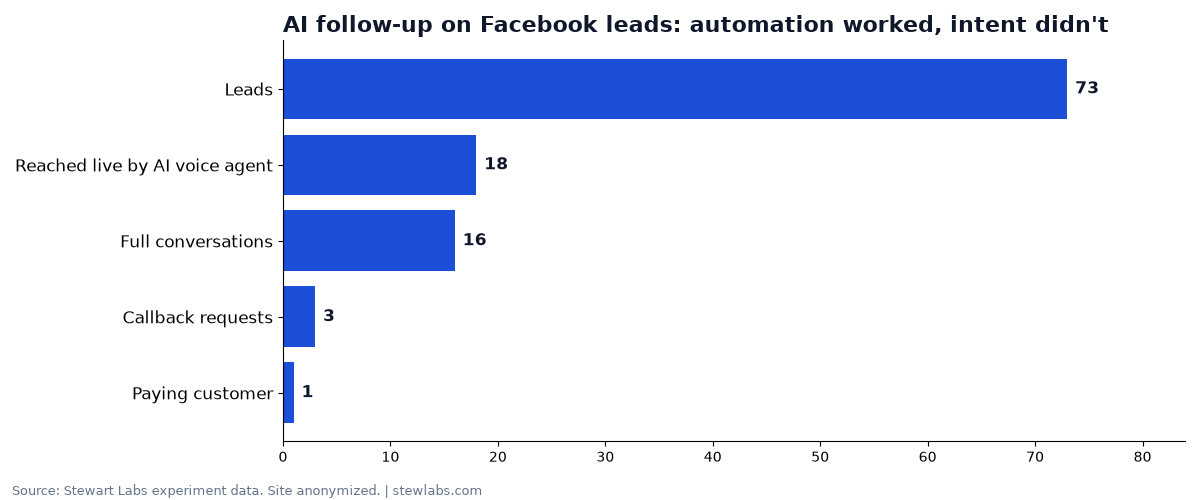
AI follow-up on 73 Facebook leads. The automation worked; the intent wasn't there.
This is where most small businesses hope AI will rescue their marketing, and it's where we learned the most expensive lesson.
On a B2B job board, we spent $321.63 on Facebook lead ads and got 73 leads. An AI voice agent called every one automatically and reached 18 live people. It held real conversations and handed off the people who wanted a human. One became a paying customer, for $49. (Full case study.)
The AI did its job. The leads were the problem. Automated follow-up multiplies whatever intent is already there. Point it at people who already want you, like missed callers, recent customers and quote requests, and it's excellent. Point it at cheap, low-intent leads, and it just reaches more people who won't buy, faster.
What to use: follow-up automation inside the CRM or field-service tool you already use. Good first projects are missed-call text-back and automated Google review requests, because the intent is already there.
Job 4: Report
What we use: an AI agent that pulls numbers from each tool and writes a short daily plan and weekly summary, with every figure tied to its source.
The rule that makes this work is that the AI must never invent a number. Every figure in our reports and in these case studies traces back to a specific export or dashboard. If a number isn't available, the report says so.
What to use: an AI assistant plus a simple automation (Zapier, Make or your CRM's built-in workflows) that collects your key numbers into one place each week. Even a shared spreadsheet that the AI summarizes works.
The job AI does badly: mass content
Our clearest SEO win came from switching AI content off.
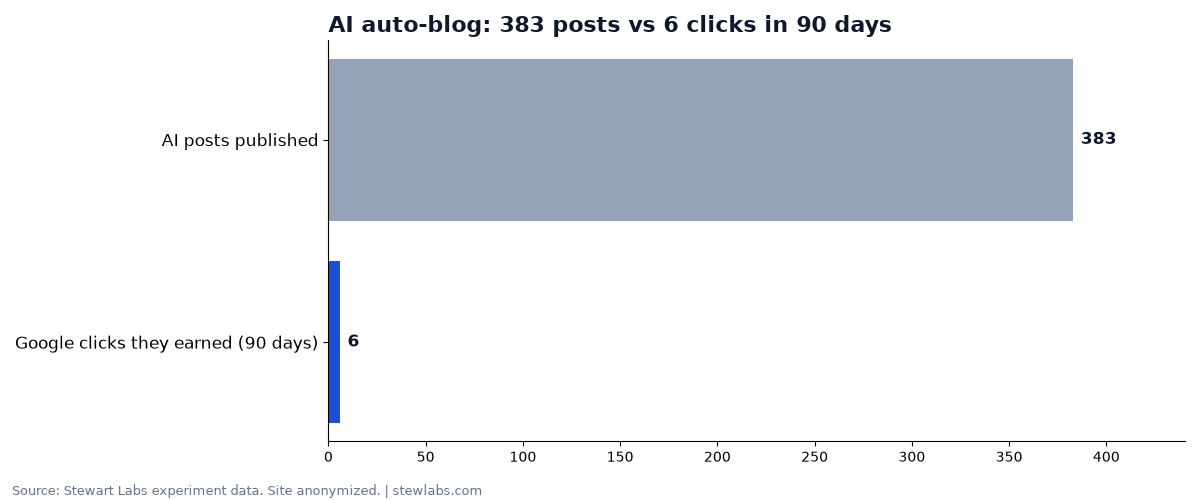
383 auto-published AI posts earned 6 Google clicks in 90 days.
A safety-training SaaS we run had an AI auto-blogger publishing posts on a schedule. It produced 383 posts. Over 90 days, they earned 6 Google clicks combined, and no single post earned more than one. We kept one and redirected the other 382 to stronger pages. Over the same stretch, the site's weekly Google clicks went from 5 to 33. Other fixes shipped the same month, so the redirects don't get all the credit, but losing the posts cost nothing. (Full case study.)
Google's position is that AI content isn't banned, but "using AI doesn't give content any special gains," and using automation to generate content mainly to manipulate rankings breaks its spam policies (Google Search Central). AI is great for drafting a page a real expert then improves. It's bad at replacing the expert. For more, see how AI auto-blogging hurt our SEO.
Our stack, in one table
| Job | What we run | Small-business alternative |
|---|---|---|
| Thinking and writing | General AI assistant | ChatGPT, Claude or Gemini |
| Find what's broken | AI agent + Search Console, Google Ads, Meta Ads, PostHog, Fathom | AI assistant + Search Console + Google Analytics exports |
| Fix and build | AI coding agent (Replit) with tests | Your website platform's built-in AI tools |
| Follow up | GoHighLevel CRM with AI voice, text and email | Follow-up built into your CRM or field-service tool |
| Connect tools | Zapier | Zapier or Make |
| Report | AI agent writing daily and weekly summaries | AI assistant summarizing a weekly spreadsheet |
We haven't listed prices, because they change often and depend on plans and usage. Check each vendor's current pricing before you commit.
How to pick your first AI marketing tool in a week
- Day 1: Write down your bottleneck. Is it getting found, following up or knowing what's working? Pick one.
- Day 2: Check what you already pay for. Your CRM, website builder and email tool probably already have AI or automation features you haven't switched on.
- Day 3: Choose one job and one tool. For example: "Send a missed-call text within a minute, using our phone system's built-in automation."
- Day 4: Set a number to watch. Calls returned, reviews per week, Search Console clicks.
- Day 5: Put a person on approval. Anything that spends money, or is published or sent under your name, gets a human check.
- Days 6–7: Run it and measure. Check the number after two weeks. Keep it, fix it or kill it.
Mistakes to avoid
- Buying a tool before naming the job. Most "AI marketing platforms" overlap with what you already have.
- Automating content volume. See above.
- Letting AI spend money unattended. Every ad change in our businesses gets a person's OK.
- Trusting one dashboard. Our "80% traffic drop" would have caused a bad decision if we'd only looked at one tool.
- Skipping stop rules. Decide in advance what result makes you pause.
FAQ
What is the best AI for small business?
For most small businesses, a general AI assistant (ChatGPT, Claude or Gemini) plus the automation features in tools you already pay for. Add specialist tools only for a specific, measured job.
Can AI do my marketing for me?
It can do a lot of the work: analysis, drafting, follow-up and reporting. But in our experience it works best with a person approving spend and anything published under your name, and it can't fix low-intent leads or a weak offer.
Is AI-written content bad for SEO?
Not automatically. Google says it rewards helpful content however it's made. But mass-produced AI posts did nothing for us: 383 posts earned 6 clicks in 90 days.
How much does AI marketing cost for a small business?
It depends on the tools and plans you choose, and prices change often, so check current vendor pricing. Starting with features you already pay for is the cheapest way in.
What should I automate first?
Something where the customer already wants to hear from you: missed-call text-back, review requests or quote follow-up.