
The short answer: AI auto-blogging hurts SEO when it publishes lots of pages that add nothing new, and that's exactly what most auto-blog tools do. Google doesn't penalize content just for being written by AI, but it says AI gives content no special boost, and it treats mass-produced pages "without adding value for users" as spam. On one of our sites, 383 auto-published AI posts earned 6 Google clicks in 90 days. If you're running an auto-blogger, turn it off, audit what it published, keep the few posts that earn traffic, and redirect the rest to strong pages. Use AI to help you write fewer, better pages instead.
This guide covers what Google actually says, how to audit an AI-generated blog step by step, and how to use AI for SEO without the downside.
What Google says about AI content
Google's position has been consistent since it published its guidance on AI-generated content in February 2023 (Google Search Central):
- It rewards quality content however it's produced. Google says it focuses on content that demonstrates experience, expertise, authoritativeness and trustworthiness (E-E-A-T), not on how the content was made.
- Automation built to manipulate rankings is spam. Using AI or automation "with the primary purpose of manipulating ranking in search results" violates its spam policies.
- AI gives no special advantage. In Google's words: "Using AI doesn't give content any special gains."
Google's current spam policies name this pattern directly. Scaled content abuse includes "using generative AI tools or other similar tools to generate many pages without adding value for users." The policy also says that if you host content like this, you should exclude it from Search (Google spam policies).
So the question isn't "Was AI involved?" It's "Does this page add anything a searcher can't already find?" Most auto-blogs fail that test, because they're designed to publish on a schedule, not to say something new.
What happened on our site
We run a small safety-training SaaS. It had an AI auto-blogger publishing posts automatically, on topics close to what the product covers. The idea was the usual pitch: more pages, more keywords, more traffic.
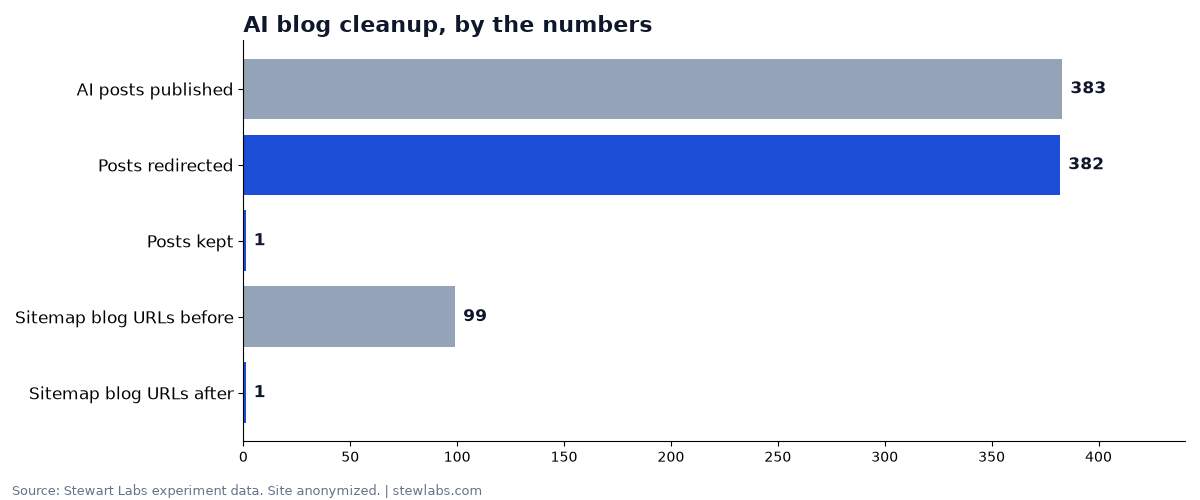
The cleanup, by the numbers.
Here's what the data showed when we pulled 90 days of Google Search Console numbers:
- 383 AI-written posts were published.
- Together they earned 6 clicks and 1,431 impressions in 90 days.
- No single post earned more than 1 click.
- The worst post showed up 437 times at an average position around 85, which is page nine of the results, where effectively nobody looks.
We switched the auto-blogger off on October 22. Then we kept the 1 post that met our keep rules and redirected the other 382 to 5 strong topic hubs, in four batches. The site's redirect map grew to 430 entries, and the blog URLs in the sitemap fell from 99 to 1. (Full case study.)
Over the same stretch, weekly Google clicks for the site went from 5 to 33. We also shipped other fixes that month, including retitling pages and server-rendering content, so the cleanup doesn't get all the credit. But it's clear that losing the AI posts cost nothing: they were earning almost no traffic to begin with. (How the site went from 5 to 33 weekly clicks.)
Why auto-blogging usually fails
From our experience and Google's guidance, the problems come from how these tools work:
- No new information. The AI writes from what's already online, so the post adds nothing new. Searchers already have better versions of it.
- Too many pages on the same topics. Dozens of similar posts compete with each other and with your real pages.
- No real experience. Nothing in the posts comes from actually doing the work: no photos, data or examples.
- Nobody checks them. Mistakes and thin pages pile up quietly.
- They dilute your site. A sitemap full of low-value posts sends crawlers to the wrong pages. Ours had 99 blog URLs, and almost none of them earned a click.
Step-by-step: audit an AI-generated blog
If you've been running an auto-blogger, here's the process we used.
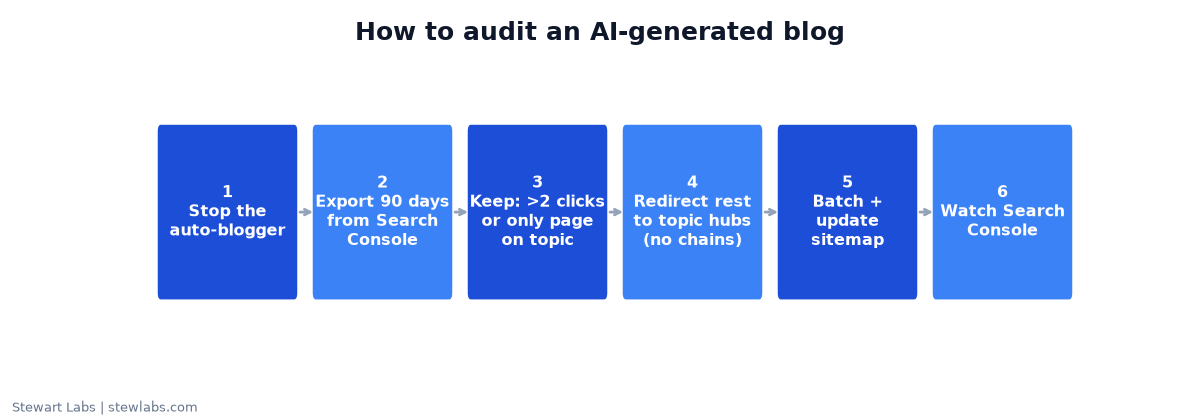
The audit process we used.
Step 1: Stop publishing
Switch the auto-blogger off before you do anything else. Otherwise you're auditing a moving target.
Step 2: Export the numbers
In Google Search Console, open Performance, set the date range to the last 3 months, go to the Pages tab and export it. Filter it down to your blog URLs.
You want clicks, impressions and average position for every post.
Step 3: Sort into keep and redirect
These are the rules we used:
- Keep any post with more than 2 clicks in 90 days.
- Keep any post that's the only page on your site about its topic.
- Everything else gets redirected.
These thresholds are a judgment call, not a law. On our site, only 1 post of 383 needed to be kept. On yours, more might. Adjust the threshold to your traffic.
Step 4: Pick a destination for every redirect
Each redirected post should point to the most relevant strong page: a topic hub, a service page or a better guide. Our rules:
- Never redirect to the homepage in bulk. It's not relevant to the reader, and Google may treat it as a dead page.
- No redirect chains. Each old URL should go directly to its final destination in one step.
- Group by topic. We used five hubs, each covering a cluster of related posts.
Google's own spam policies note that "consolidating several pages into one" is a legitimate use of redirects (Google spam policies).
Step 5: Redirect in batches
We redirected in four batches rather than all at once, and checked each batch before starting the next. That makes it much easier to catch mistakes, like a redirect pointing to the wrong place.
Step 6: Update the sitemap
Remove the redirected URLs from your sitemap so it lists only pages you actually want indexed. Ours went from 99 blog URLs to 1.
Step 7: Check your counts
Our first rough estimate was "about 330" AI posts. When we actually counted, there were 383. Always count from the real data before and after. Estimates are easy to get wrong when a tool has been publishing unattended.
Step 8: Watch Search Console for a few weeks
Look for:
- Errors in the Pages (indexing) report
- The redirected URLs dropping out of results
- Clicks and impressions on your hub pages
How to use AI for SEO without hurting rankings
We use AI across our SEO work every day. These are the uses that have paid off:
| Use AI for | Not for |
|---|---|
| Analyzing Search Console data to find "almost" pages | Publishing posts automatically on a schedule |
| Rewriting titles and meta descriptions to match real searches | Spinning out dozens of near-identical posts |
| Drafting an outline a real expert then fills in | Writing about things you haven't done |
| Checking that pages are readable by crawlers | Creating pages only to target keywords |
| Building data-backed pages where you have real data | Thin "city" or "keyword" page variants |
| Writing reports and to-do lists from real numbers | Inventing statistics |
Two examples from the same site:
- Retitling. We rewrote the titles of pages sitting in positions 7 to 15 to lead with the phrases people actually searched. One page had 57 impressions at position 7.6 and had been clicked once.
- Making pages readable. We server-rendered pages that were sending crawlers almost empty HTML. Afterward, a crawler could read 1,982 words and 26 links on a longer guide without running JavaScript.
Both were AI-assisted changes, checked by a person and backed by data, and both were part of the week the site went from 5 to 33 weekly clicks.
A simple rule for any AI-written page
Before you publish, ask:
- Does it include something only we could write? Our data, photos, process or experience.
- Would a customer bookmark or share it?
- Is there already a page on our site about this? If so, improve that page instead.
- Has a person who knows the subject read and edited it?
If the answer to the first question is no, don't publish it.
FAQ
Does Google penalize AI-generated content?
Not just for being AI-generated. Google says it rewards helpful content however it's produced. But it treats mass-produced pages made "without adding value for users" as scaled content abuse, and AI gives content no special boost.
Should I delete my AI blog posts?
Audit them first. Keep any that earn traffic or are your only page on a topic, and redirect the rest to the most relevant strong page. We kept 1 post out of 383 and redirected 382.
Is redirecting better than deleting?
Usually, yes, if there's a relevant page to send people to. A redirect sends readers and any existing links to a useful page. Don't redirect everything to the homepage.
Can AI help with SEO at all?
Yes. In our experience it's best at analysis, title rewrites, technical fixes and drafting pages that a person then improves with real experience and data.
How long does it take to see results after cleaning up?
It varies. On our site, weekly clicks went from 5 to 33 in the same stretch as the cleanup, alongside other fixes. Give it several weeks and track Search Console.