
The short answer: we got a small safety-training SaaS from 5 to 33 Google clicks a week without publishing more AI content. We switched off its AI auto-blog, redirected the thin posts, made the pages readable to Google without JavaScript, and retitled the pages that were already close to page one. Clicks rose from 5 (Oct 15–21) to 33 (Oct 22–28). By Nov 2 the site had 53 clicks in 28 days, after just 5 in all of September.
We run AI automation on our own businesses and publish what works with real numbers. This is one of them. The numbers are small, and we won't pretend otherwise. This is what the first real movement looks like for a tiny site, and you can copy the steps.
The business
The site sells a low-cost subscription for construction and workplace safety talks, the short "toolbox talks" crews run before a shift. It has a few paying customers, a library of several hundred topic pages and almost no marketing budget. AI agents do most of the day-to-day work. A human approves anything that costs money or goes out under the owner's name.
Here is what Search Console showed before this push:
- Week of Oct 15–21: 5 clicks, 512 impressions, 0.98% click-through rate, average position 48.6.
- 28 days to Oct 24: 9 clicks, 1,887 impressions.
So Google knew the site existed and showed it about 70 times a day. But it almost always ranked on page 5 or deeper, where nobody clicks.
What was wrong
Three problems stood out in the audit.
1. Google was seeing empty pages
The site is a modern JavaScript app, so the browser builds each page when a person visits. But on the topic pages, the raw HTML from the server was mostly empty, and that HTML is what a crawler reads first. The real content only appeared after JavaScript ran.
Google can render JavaScript, but it does so later and less reliably, and many other crawlers don't do it at all. If your page source is a blank <div>, search engines have to do extra work just to learn what the page is about.
How to check your own site: open a page, right-click and choose "View page source" (not "Inspect"). If your headline and paragraphs aren't in that source, you have this problem.
2. An AI auto-blog was flooding the site with thin posts
At some point the site had been set up to generate blog posts with AI, and it produced hundreds of them. They had generic titles in the "Mastering…", "Essential…" and "Boost…" style, and most ranked in positions 35 to 85. Each one also competed with the site's own, better topic pages.
A lot of small businesses fall into this trap right now. AI makes content cheap, so the instinct is to publish a lot of it. But hundreds of near-duplicate posts don't build authority. They split it. (We wrote up the full cleanup separately: how we redirected 430 AI blog posts.)
3. The pages that could rank weren't set up to win
Some topic pages already sat on page one or close to it, but their titles didn't match what people searched for. One page had 57 impressions in 28 days at position 7.6 and had been clicked once.
What we changed (Oct 22–28)
Here is everything that went live during the week we measured, in order.
- Oct 22: turned off the auto-blog and started consolidating. We switched the auto-blog off behind a flag; its last post was Oct 20. In the first phase, we permanently redirected (301) a set of the weakest posts to hub pages on the same topics. Nothing was deleted from the database. The old posts now point to the better page.
- Oct 24: server-rendered the topic pages. The server now sends real content in the HTML: the preview text and internal links. The paid parts stay behind the paywall. After the change, a crawler could read 242 words and 8 links on one short talk, and 1,982 words and 26 links on a longer guide, without running any JavaScript.
- Oct 25–26: published a few focused, open guides. We didn't add more generic posts. Instead we wrote a few guides aimed at specific searches with clear demand and low competition. Each had real sources, a ready-to-use script, FAQs and one free-trial call to action. One example is a "100 safety topics by category" guide that links to 100 real topic pages. Before writing each guide, we checked whether an existing page already ranked for that phrase. If one did, we picked a different angle so the two pages wouldn't compete.
- Oct 25–28: retitled pages that were close to page one. For pages ranking roughly 7 to 15, we rewrote the title tag, H1 and meta description to lead with the phrase people actually searched for (for example "[Topic] Toolbox Talk") instead of a generic label.
- Oct 28: a second, small redirect phase. By the end of the week, 47 old posts in total pointed to the hubs.
Every change was tested and checked live. Each publish ran the site's automated test suite, which grew from 127 to 143 tests that week. We then checked live that the pages, sitemap, signup, pricing and paywall still worked.
The result
Here is Search Console for the week of the changes compared with the week before:
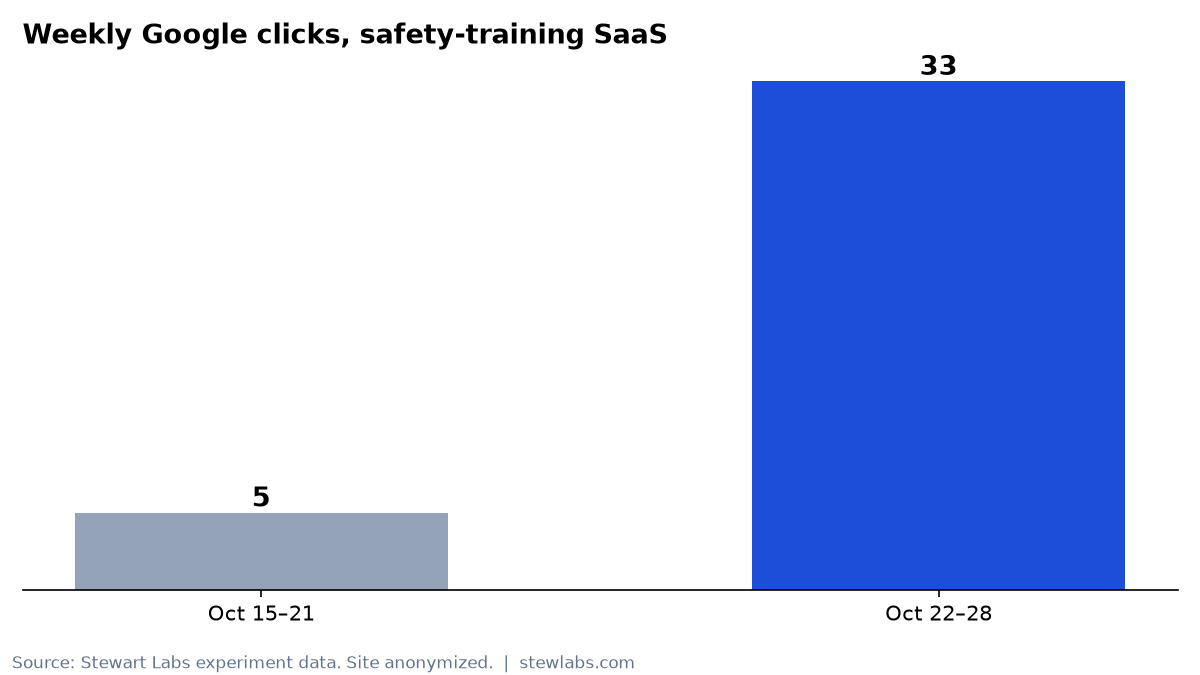
Weekly Google clicks, from Search Console.
| Oct 15–21 | Oct 22–28 | |
|---|---|---|
| Clicks | 5 | 33 |
| Impressions | 512 | 1,036 |
| Click-through rate | 0.98% | 3.19% |
| Average position | 48.6 | 32.1 |
Impressions doubled. Average position improved by about 16 spots, and click-through rate more than tripled.
The best single day was Oct 26, with 11 clicks from 227 impressions. The site had only 9 clicks in the 28 days before, so that one day beat the whole prior month.
The honest part: where the clicks came from
One page did most of the work. A seasonal "safety topics for this month" page drove 25 of the week's 33 clicks, at an average position of 5.5. On Oct 26 alone it drove 10 of the 11 clicks.
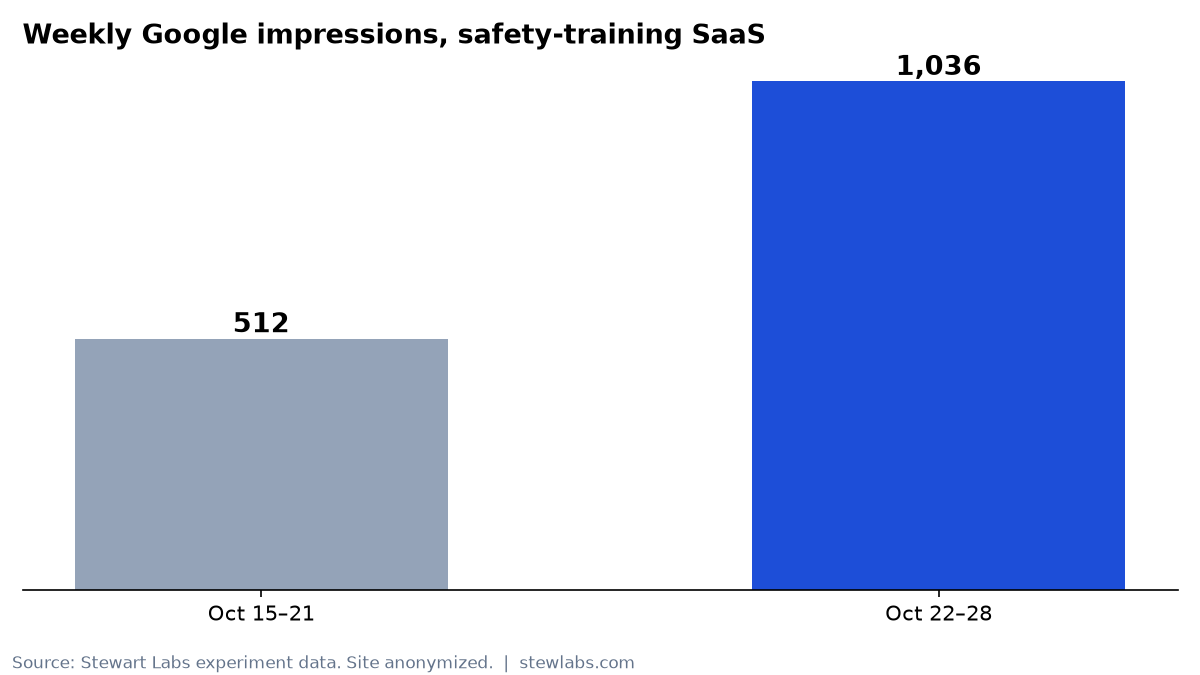
Weekly impressions roughly doubled.
Then the month turned. From Oct 29 to Nov 2, the whole site got 13 clicks, and that page got 4. Its ranking didn't drop; its average position was 5.1, about the same as before. What dropped was search demand. Its impressions fell from 319 in a week to 76 in five days. People search for next month's safety topics before the month starts.
That tells us three things:
- Seasonal pages are an underrated win for trades and service businesses. People search "[month] safety topics," "[season] maintenance checklist" and "[holiday] hours" every year. A page built for that search and refreshed each cycle can rank quickly, because the competition is often thin.
- Seasonal traffic arrives in waves, so plan the next page before the wave. The next month's page needs to be live and ranking before people start searching for it.
- We can't credit each change with a specific share of the lift. Several changes went live in the same week. Server-rendering and consolidation most likely helped Google trust and understand the site. The seasonal page turned that into clicks. Anyone who claims to know which change produced which click from one week of data is guessing.
The most important caveat: more clicks haven't brought more customers yet. In this period the site got zero real new signups, and recurring revenue stayed at $58 a month from 2 paying customers. Visitors did reach the paywall (35 paywall views from 12 people on Oct 28 alone), but none bought. Traffic is the first step, not the finish line. The next experiment on this site is about conversion.
What we did next
Once Google could read the site properly, we finished the cleanup. On Oct 29 we redirected 382 more auto-blog posts in four tested batches, each to the most relevant hub or guide. The redirect map grew to 430 posts. Blog URLs in the sitemap fell from 99 to 1, and only the one real guide was kept. Again, nothing was deleted from the database.
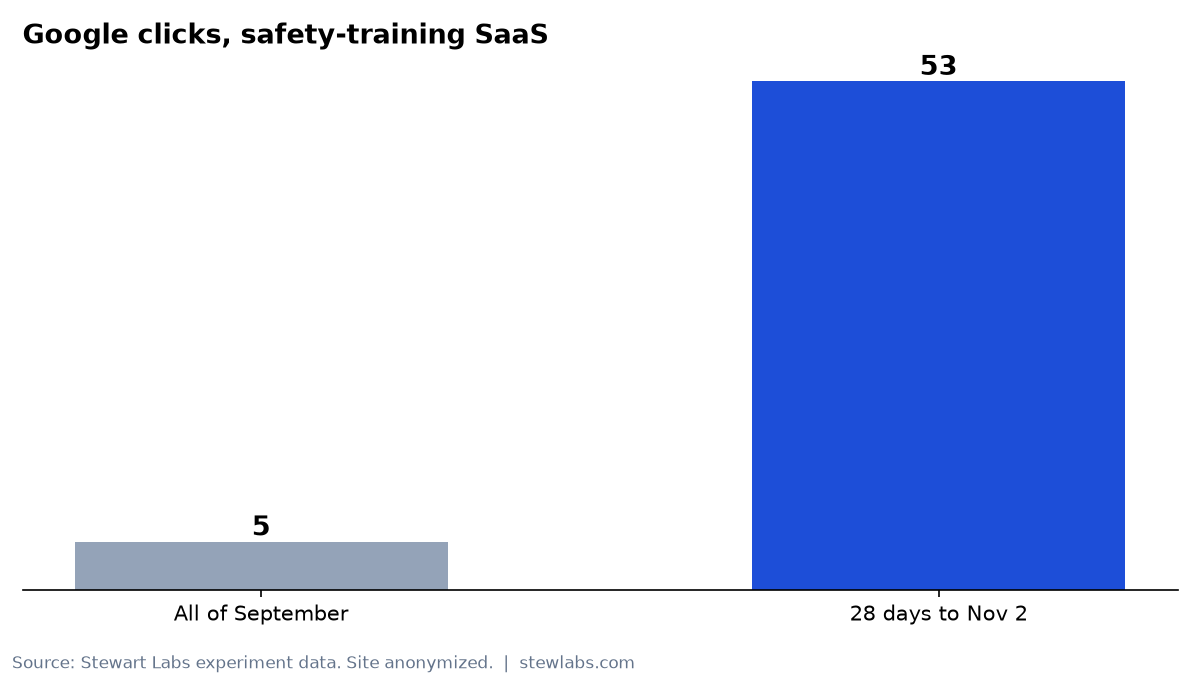
Clicks by month, from Search Console.
We also started a series of trade-specific pages, such as toolbox talks for electricians, roofers and concrete crews. By Nov 3, 12 trades were live. We'll report on them in a separate post once there's enough data.
How to copy this for your business
You don't need to run a SaaS for this to apply. The same steps work for a plumber, a dental office or a landscaping company:
- Check that Google can read your pages. View the page source. If your content isn't there, ask your developer about server-side rendering or prerendering. WordPress, Squarespace and Wix sites are usually fine here.
- Audit any AI-generated content. If you or an agency published dozens of generic posts, use Search Console to find the ones with no clicks. Redirect each one to your best page on the same topic instead of just deleting it.
- Find your "almost" pages. In Search Console › Performance › Pages, sort by impressions and look for pages in positions 5 to 15. Rewrite their titles to match the exact phrase people search.
- Build one seasonal page, and the next one early. Decide what your customers search for at the same time every year. Make the best page on the internet for it, and publish next season's page before the searches start.
- Measure week over week, and keep the dates. Write down what changed and when. It's the only way to know what worked.
This is a real, anonymized experiment from a business we operate. All numbers come from Google Search Console, our product analytics and our billing records for the dates shown. We don't round up, and we'll publish the follow-up whether the numbers go up or down.