
The short answer: roofing SEO comes down to four things: a complete, accurate Google Business Profile, one strong page for each roofing service you sell, real pages for the areas you serve (not copy-pasted city pages), and a steady flow of genuine reviews. Make sure Google can actually read your pages, write titles that match what homeowners search, and fix the pages that are already close to page one before you write anything new. AI can speed up every step, but it can't replace your photos, your jobs and your local knowledge, and those are what make a roofing site rank.
This guide is a step-by-step plan a roofing company owner can follow, or hand to whoever runs the website. Where we use lessons from our own sites, we say so, and we link to the full case study.
How roofing SEO works
When a homeowner searches "roof repair near me" or "roofer in [city]," Google usually shows two kinds of results:
- The map pack, driven mostly by your Google Business Profile, your reviews and how close you are.
- The regular results, driven by your website's pages.
You need both. The Business Profile wins the "I need someone now" searches. Your website wins the research searches ("how much does a metal roof cost," "repair or replace roof") and backs up the profile.
Step 1: Get your Google Business Profile right
Most roofers are service-area businesses: you go to the customer. Google's guidelines are specific about how to set that up (Google Business Profile guidelines):
- One profile for your business, with a service area. If you work from home, hide your address.
- No virtual offices. A rented mailing address you don't work from isn't eligible.
- Keep your service area realistic. Google says it generally shouldn't extend farther than about two hours' drive from where you're based.
- Use your real business name. Adding keywords like "Best Roofing Contractor Springfield" to the name isn't allowed and can get the profile suspended.
- Pick as few categories as possible, and make them specific. Choose what your business is ("Roofing contractor"), not everything it does.
- Use a local phone number you control, not a call-tracking number that redirects elsewhere.
Then fill in everything: services, hours, a plain description of what you do (no links or promotions are allowed in the description) and real photos of your crews and finished jobs.
Step 2: Build one strong page per service
Homeowners search for specific jobs, not "roofing services." Give each main service its own page:
- Roof repair
- Roof replacement
- Storm and hail damage, including insurance claims
- Metal roofing
- Shingle roofing
- Flat or commercial roofing, if you do it
- Gutters, skylights or other add-ons you actually sell
Each page should answer the questions a homeowner has before calling:
- What the service is, and the signs they need it.
- Your process, from inspection to cleanup.
- Materials and brands you install.
- What affects the price. You don't have to publish prices, but explain the factors (roof size, pitch, layers to tear off, materials).
- Real photos of your jobs, with a short caption of where and what.
- Warranty and licensing details.
- A short FAQ.
- A clear way to book an inspection, with your phone number.
Where AI helps: have AI draft the structure and the FAQ, then rewrite it in your words with your process, your photos and your prices. A page that could describe any roofer anywhere won't stand out.
Step 3: Build service-area pages the right way
This is where many roofing sites go wrong. It's tempting to create 50 pages that read "Roof Repair in [Town]" with only the town name swapped. Google's spam policies call this doorway abuse. They specifically list "having multiple domain names or pages targeted at specific regions or cities that funnel users to one page" and "substantially similar pages" as examples (Google spam policies).
A service-area page is worth having only if it has something specific to that place:
- Jobs you've actually done there, with photos.
- Local details that matter for roofs: common housing styles, typical storm or hail seasons, local permit notes.
- Reviews from customers in that area.
Our rule of thumb: if you can't write at least a few sentences that are only true for that town, don't create the page yet. Start with your main towns and add more as you do jobs in them.
We used a similar rule when building location and model pages for a classic-car marketplace we run. We only created pages where there was real data to show, and we kept pages that didn't meet the threshold out of the sitemap. That build shipped 808 pages in one day. Results are still early, with 3 clicks so far, and we'll publish the 30-day numbers either way. (Read the build log.)
Step 4: Make sure Google can read your site
A surprising number of small business sites look fine to a person but send Google almost nothing. Check yours:
- Open one of your service pages in a browser.
- Right-click and choose View Page Source.
- Search the source for a sentence from the page.
If the sentence isn't there, your content is loaded by JavaScript after the page opens. Google can often render it, but later and less reliably, and many other crawlers and AI tools won't.
This happened on a safety-training SaaS we run. Its topic pages sent mostly empty HTML. After we server-rendered them, a crawler could read 1,982 words and 26 links on one longer guide without running any JavaScript. That was one of several fixes in a week when weekly Google clicks went from 5 to 33. (Full case study.)
Most roofing sites built on WordPress, Squarespace or Wix don't have this problem, but custom-built and some "website builder" sites do. It takes two minutes to check.
Step 5: Fix your "almost" pages first
Before writing anything new, find the pages Google already shows but nobody clicks.
- In Google Search Console, open Performance, then the Pages tab.
- Sort by impressions.
- Look for pages with an average position between roughly 5 and 15.
- Click into each one and check which searches it shows for.
- Rewrite the page's title, main heading and meta description to lead with the exact phrase people searched.
On our safety-training SaaS, one page had 57 impressions in 28 days at position 7.6 and had been clicked once. Pages like that are the cheapest wins in SEO, because Google already likes them. The title just doesn't match the search. (Full case study.)
For a roofer, that might mean changing "Our Services" to "Roof Repair in [City] | Same-Week Inspections."
Step 6: Publish seasonal and storm content before the season
Roofing demand moves with the weather. Homeowners search for hail damage after a storm, ice dams in winter and roof inspections before selling a home.
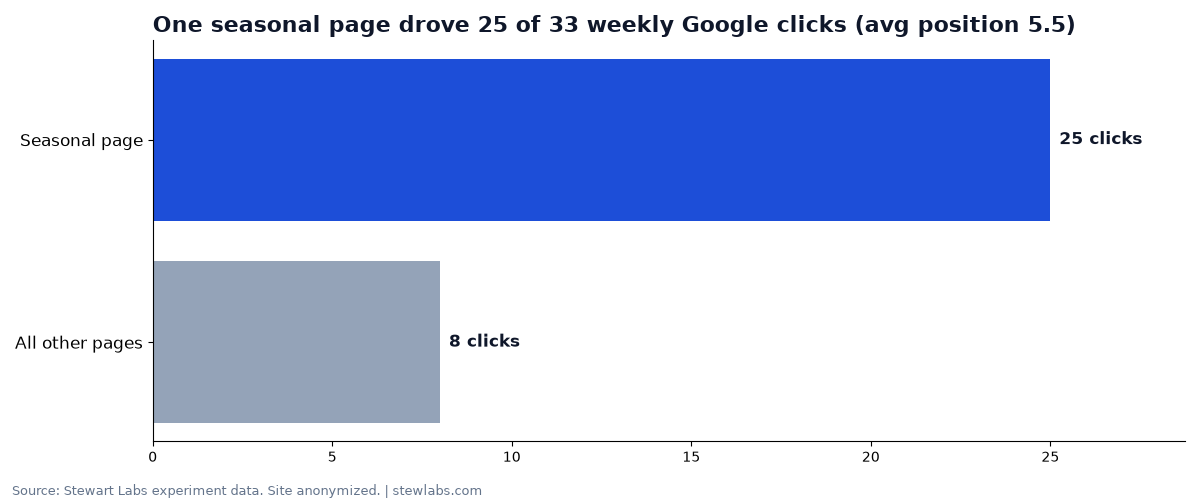
One seasonal page drove 25 of 33 weekly clicks on a site we run.
Our biggest single SEO win was a seasonal page. On the safety-training SaaS, a "safety topics for this month" page drove 25 of the week's 33 clicks at an average position of 5.5. Seasonal searches often have thin competition, and a page built for them can rank quickly. (Full case study.)
For a roofing company, seasonal pages might include:
- "What to do after hail damage" (with your inspection process and insurance claim steps)
- "Winter roof problems: ice dams and how to prevent them"
- "Roof inspection before selling your home"
Publish them before the season starts, so they're indexed and ranking when people start searching.
Step 7: Earn reviews on every job
Reviews feed the map pack directly, and they're the easiest roofing SEO step to automate. Ask every customer, the day the job is finished, with your Google review link. Send one reminder, then stop. Never offer a discount for a review, and don't only ask the happy customers. Both break Google's rules.
Our full guide: how to get more Google reviews.
Step 8: Don't fill your blog with AI posts
You'll be pitched tools that publish 30 roofing blog posts a month. Be careful. On a site we run, an AI auto-blogger produced 383 posts that earned 6 Google clicks combined in 90 days. (Full case study.) Google's spam policies call out "using generative AI tools or other similar tools to generate many pages without adding value for users" as scaled content abuse (Google spam policies).
Write fewer, better pages, using your own photos, jobs and answers to the questions customers actually ask you on the phone.
How AI fits into roofing SEO
Here's where AI saves real time, with a person checking the result:
| Task | What AI does | What you add |
|---|---|---|
| Service pages | Drafts the structure and FAQ | Your process, photos, materials, warranty |
| Area pages | Organizes job notes into a page | Real jobs, local details, reviews |
| Title rewrites | Matches titles to Search Console queries | Approves wording |
| Review replies | Drafts a specific reply | Reads and posts it |
| Weekly report | Summarizes Search Console and calls | Decides what to do next |
A 30-day roofing SEO plan
- Week 1: Clean up your Google Business Profile. Check that Google can read your site (Step 4).
- Week 2: Fix your "almost" pages in Search Console. Set up automatic review requests.
- Week 3: Build or rewrite your top three service pages.
- Week 4: Publish one seasonal page and one real service-area page for your main town.
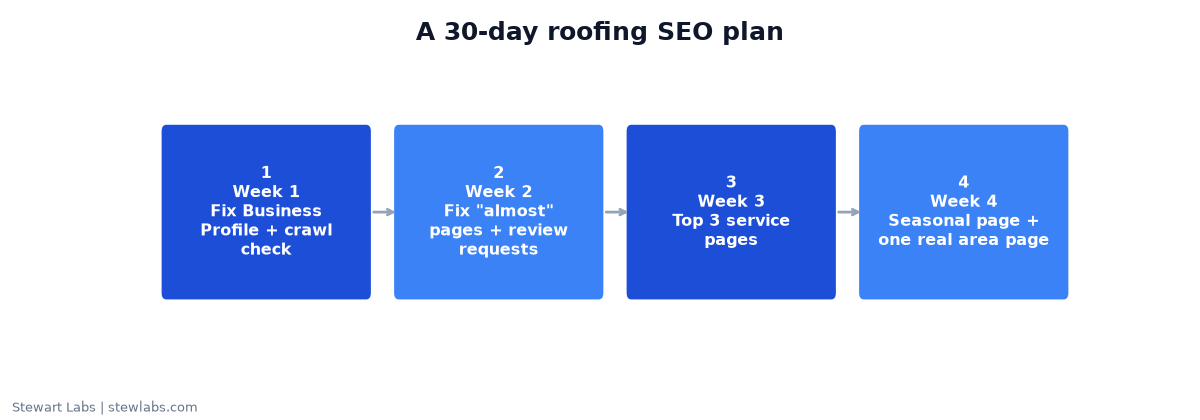
The 30-day plan at a glance.
Then repeat: one or two strong pages a month, and a weekly look at Search Console.
FAQ
How long does roofing SEO take to work?
It depends on your competition and where your site starts. Fixes to pages Google already ranks can show up within weeks. New pages usually take longer. Be wary of anyone who guarantees rankings by a date.
Should I create a page for every city I serve?
Only for places where you can say something specific: real jobs, local photos, reviews. Near-identical city pages count as doorway abuse under Google's spam policies.
Can I put keywords in my Google Business Profile name?
No. Google's guidelines say your profile name must match your real-world business name, and adding extra keywords can lead to suspension.
Does AI-written content work for roofing SEO?
AI drafts are fine as a starting point. Pages that rank need real detail from your business: your photos, process and local experience.
What's the most important roofing SEO factor?
For "near me" searches, your Google Business Profile and reviews. For everything else, having a clear, specific page for each service you sell.